[3D Programming with DirectX12] Chapter 15 : Building a first Person Camera and Dynamic indexing
1인칭 카메라 제어와 dynamic indexing을 소개합니다.
15장부터는 DX12의 응용을 배운다. 이번 장에서는 FPS게임에서 주로 쓰이는 1인칭 카메라, 그리고 dynamic indexing이라는 개념을 다룬다.
1인칭 카메라
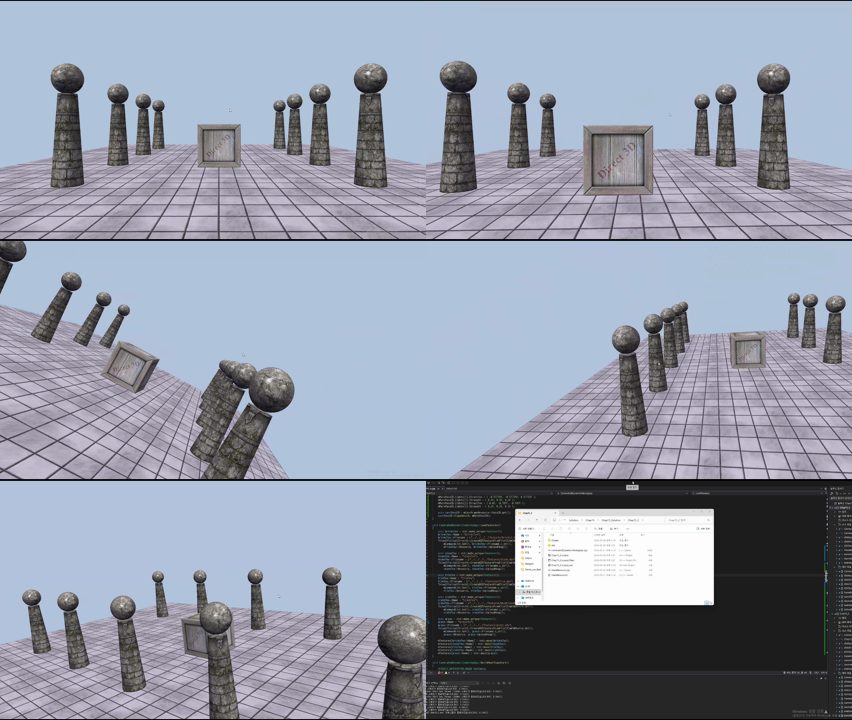
1인칭 카메라를 구현할 때 필요한 정보는 세 가지이다.
- 월드 좌표계
- 카메라 위치
- 카메라 좌표계
이것을 이용하면 기존의 월드 Matrix를 카메라 시점 View Matrix로 바꿀 수 있다.
$$\mathbf{i}, \mathbf{j}, \mathbf{k} = world Coordinate$$
$$\mathbf{u}, \mathbf{v}, \mathbf{w} = camera Coordinate$$
\[\mathbf{i} \cdot \mathbf{u} = u_x, \quad \mathbf{i} \cdot \mathbf{v} = v_x, \quad \mathbf{i} \cdot \mathbf{w} = w_x\] \[\mathbf{j} \cdot \mathbf{u} = u_y, \quad \mathbf{j} \cdot \mathbf{v} = v_y, \quad \mathbf{j} \cdot \mathbf{w} = w_y\] \[\mathbf{k} \cdot \mathbf{u} = u_z, \quad \mathbf{k} \cdot \mathbf{v} = v_z, \quad \mathbf{k} \cdot \mathbf{w} = w_z\] \[R = \begin{bmatrix} u_x & v_x & w_x & 0 \\ u_y & v_y & w_y & 0 \\ u_z & v_z & w_z & 0 \\ 0 & 0 & 0 & 1 \end{bmatrix}\] \[T(-Q) = \begin{bmatrix} 1 & 0 & 0 & 0 \\ 0 & 1 & 0 & 0 \\ 0 & 0 & 1 & 0 \\ -Q_x & -Q_y & -Q_z & 1 \end{bmatrix}\]여기서 \(Q\)는 카메라의 위치이다. 왜 마이너스를 붙여서 \(-Q_x\)를 사용하냐면 좌표계 자체가 \(Q\)를 중심으로 이동하기 때문이다.
\[V = T(-Q) \cdot R = \begin{bmatrix} u_x & v_x & w_x & 0 \\ u_y & v_y & w_y & 0 \\ u_z & v_z & w_z & 0 \\ -\mathbf{Q} \cdot \mathbf{u} & -\mathbf{Q} \cdot \mathbf{v} & -\mathbf{Q} \cdot \mathbf{w} & 1 \end{bmatrix}\]따라서 해당 계산을 통해 View Matrix를 수학적으로 구할 수 있다.
Camera Class
Camera class
1
2
3
4
5
6
7
8
9
10
11
12
13
14
15
16
17
18
19
20
21
22
23
24
25
26
27
28
29
30
31
32
33
34
35
36
37
38
39
40
41
42
43
44
45
46
47
48
49
50
51
52
53
54
55
56
57
58
59
60
61
62
63
64
65
66
67
68
69
70
71
72
73
74
75
76
77
78
79
80
81
82
83
84
class Camera
{
public:

	Camera();
	~Camera();

	// Get/Set world camera position.
	DirectX::XMVECTOR GetPosition()const;
	DirectX::XMFLOAT3 GetPosition3f()const;
	void SetPosition(float x, float y, float z);
	void SetPosition(const DirectX::XMFLOAT3& v);

	// Get camera basis vectors.
	DirectX::XMVECTOR GetRight()const;
	DirectX::XMFLOAT3 GetRight3f()const;
	DirectX::XMVECTOR GetUp()const;
	DirectX::XMFLOAT3 GetUp3f()const;
	DirectX::XMVECTOR GetLook()const;
	DirectX::XMFLOAT3 GetLook3f()const;

	// Get frustum properties.
	float GetNearZ()const;
	float GetFarZ()const;
	float GetAspect()const;
	float GetFovY()const;
	float GetFovX()const;

	// Get near and far plane dimensions in view space coordinates.
	float GetNearWindowWidth()const;
	float GetNearWindowHeight()const;
	float GetFarWindowWidth()const;
	float GetFarWindowHeight()const;

	// Set frustum.
	void SetLens(float fovY, float aspect, float zn, float zf);

	// Define camera space via LookAt parameters.
	void LookAt(DirectX::FXMVECTOR pos, DirectX::FXMVECTOR target, DirectX::FXMVECTOR worldUp);
	void LookAt(const DirectX::XMFLOAT3& pos, const DirectX::XMFLOAT3& target, const DirectX::XMFLOAT3& up);

	// Get View/Proj matrices.
	DirectX::XMMATRIX GetView()const;
	DirectX::XMMATRIX GetProj()const;

	DirectX::XMFLOAT4X4 GetView4x4f()const;
	DirectX::XMFLOAT4X4 GetProj4x4f()const;

	// Strafe/Walk the camera a distance d.
	void Strafe(float d);
	void Walk(float d);
	void Rotate(float angle);

	// Rotate the camera.
	void Pitch(float angle);
	void RotateY(float angle);

	// After modifying camera position/orientation, call to rebuild the view matrix.
	void UpdateViewMatrix();

private:

	// Camera coordinate system with coordinates relative to world space.
	DirectX::XMFLOAT3 mPosition = { 0.0f, 0.0f, 0.0f };
	DirectX::XMFLOAT3 mRight = { 1.0f, 0.0f, 0.0f };
	DirectX::XMFLOAT3 mUp = { 0.0f, 1.0f, 0.0f };
	DirectX::XMFLOAT3 mLook = { 0.0f, 0.0f, 1.0f };

	// Cache frustum properties.
	float mNearZ = 0.0f;
	float mFarZ = 0.0f;
	float mAspect = 0.0f;
	float mFovY = 0.0f;
	float mNearWindowHeight = 0.0f;
	float mFarWindowHeight = 0.0f;

	bool mViewDirty = true;

	// Cache View/Proj matrices.
	DirectX::XMFLOAT4X4 mView = MathHelper::Identity4x4();
	DirectX::XMFLOAT4X4 mProj = MathHelper::Identity4x4();
};

#endif // CAMERA_H
기존에는 카메라에 대한 정보들을 Constant 버퍼에 하나하나 담아서 보냈다. 이제는 Camera Class를 따로 두어서 관리한다. 오브젝트의 모든 정보를 담아두는 Render Item과 같은 맥락이다.
전/후 비교
1
2
3
4
5
6
7
8
9
10
11
12
13
14
15
16
17
18
19
20
21
22
23
24
25
26
27
28
29
30
31
32
33
34
35
36
37
38
39
40
41
42
43
44
45
46
47
// 적용 전
	// Convert Spherical to Cartesian coordinates.
	mEyePos.x = mRadius * sinf(mPhi) * cosf(mTheta);
	mEyePos.z = mRadius * sinf(mPhi) * sinf(mTheta);
	mEyePos.y = mRadius * cosf(mPhi);

	// Build the view matrix.
	XMVECTOR pos = XMVectorSet(mEyePos.x, mEyePos.y, mEyePos.z, 1.0f);
	XMVECTOR target = XMVectorZero();
	XMVECTOR up = XMVectorSet(0.0f, 1.0f, 0.0f, 0.0f);

	XMMATRIX view = XMMatrixLookAtLH(pos, target, up);
	XMStoreFloat4x4(&mView, view);


// 적용 후
	const float dt = gt.DeltaTime();

	if (GetAsyncKeyState('W') & 0x8000)
		mCamera.Walk(10.0f * dt);

	if (GetAsyncKeyState('S') & 0x8000)
		mCamera.Walk(-10.0f * dt);

	if (GetAsyncKeyState('A') & 0x8000)
		mCamera.Strafe(-10.0f * dt);

	if (GetAsyncKeyState('D') & 0x8000)
		mCamera.Strafe(10.0f * dt);

	if (GetAsyncKeyState('Q') & 0x8000)
		mCamera.Rotate(5.0f * dt);

	if (GetAsyncKeyState('E') & 0x8000)
		mCamera.Rotate(-5.0f * dt);

	mCamera.UpdateViewMatrix();

  XMMATRIX view = mCamera.GetView();
	XMMATRIX proj = mCamera.GetProj();

	XMMATRIX viewProj = XMMatrixMultiply(view, proj);
	XMVECTOR det = XMMatrixDeterminant(view);
  .
  .
  .
Dynamic Indexing
해당 개념은 상대적으로 뚜렷하다. 우리는 동적 인덱스를 셰이더 프로그램의 리소스 배열 안에 넣을 것이다. 해당 인덱스는 다양한 방법으로 사용 가능하다.
- 인덱스는 Constant Buffer의 요소가 될 수 있다.
- 인덱스는 System ID가 될 수 있다.(Ex. SV_PrimitiveID, SV_InstanceID ..)
- 인덱스는 계산 결과가 될 수 있다.
- 인덱스는 텍스처로부터 올 수도 있다.
- 인덱스는 Vertex 구조의 요소로부터 올 수도 있다.
해당 데모에서는 Material Buffer에 Dynamic Indexing을 적용하는데, 간단하게 작동 과정을 설명해보겠다.
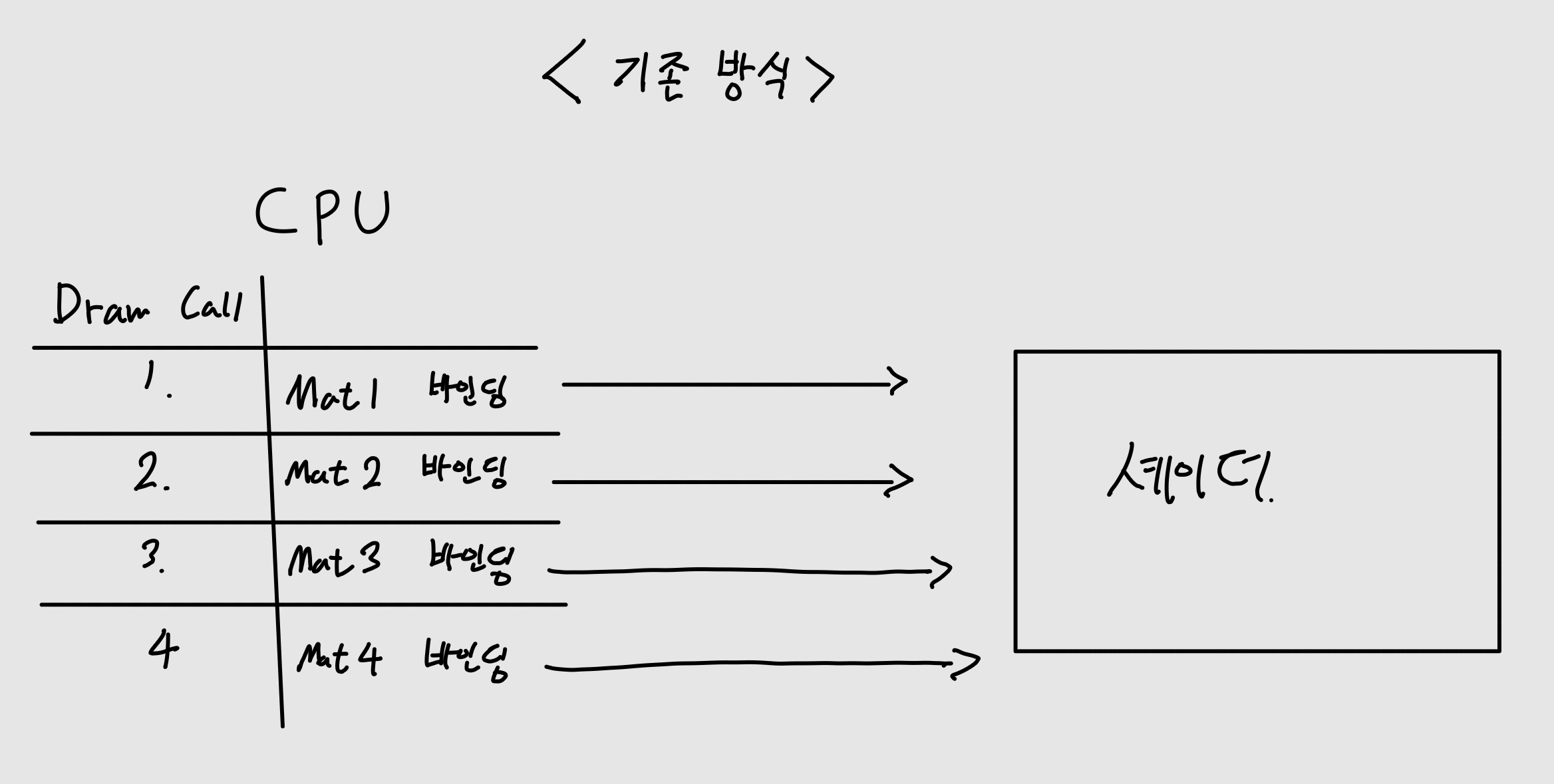
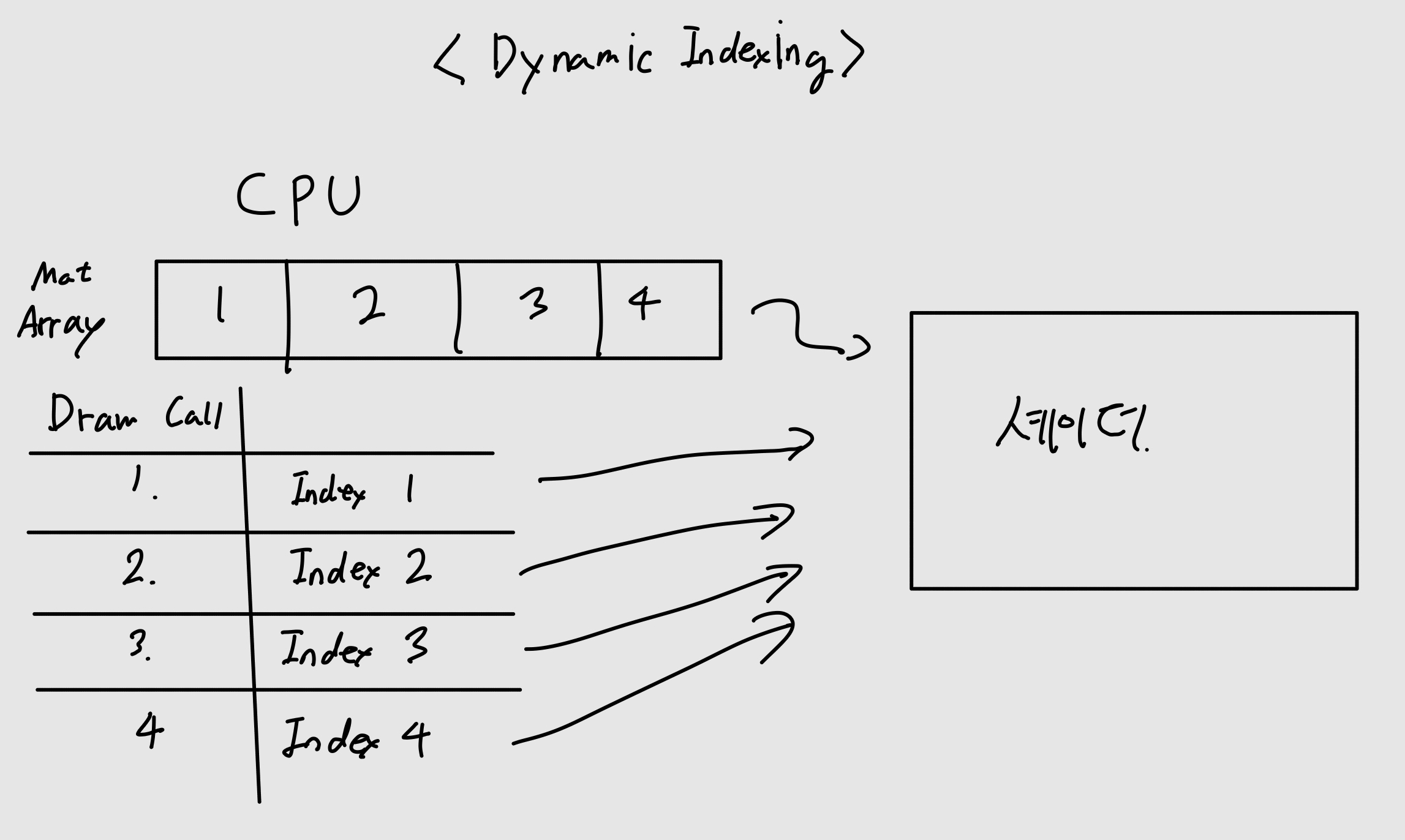
기존 방식은 셰이더에 매 드로우콜마다 머터리얼을 바인딩하고 셰이더에 보냈지만 dynamic indexing을 적용하면 머터리얼 배열을 셰이더에 한번에 보내놓고 드로우콜마다 인덱스만 전달하면 되기 때문에 드로우콜 오버헤드를 감소시킬 수 있게 된다.
연습 문제
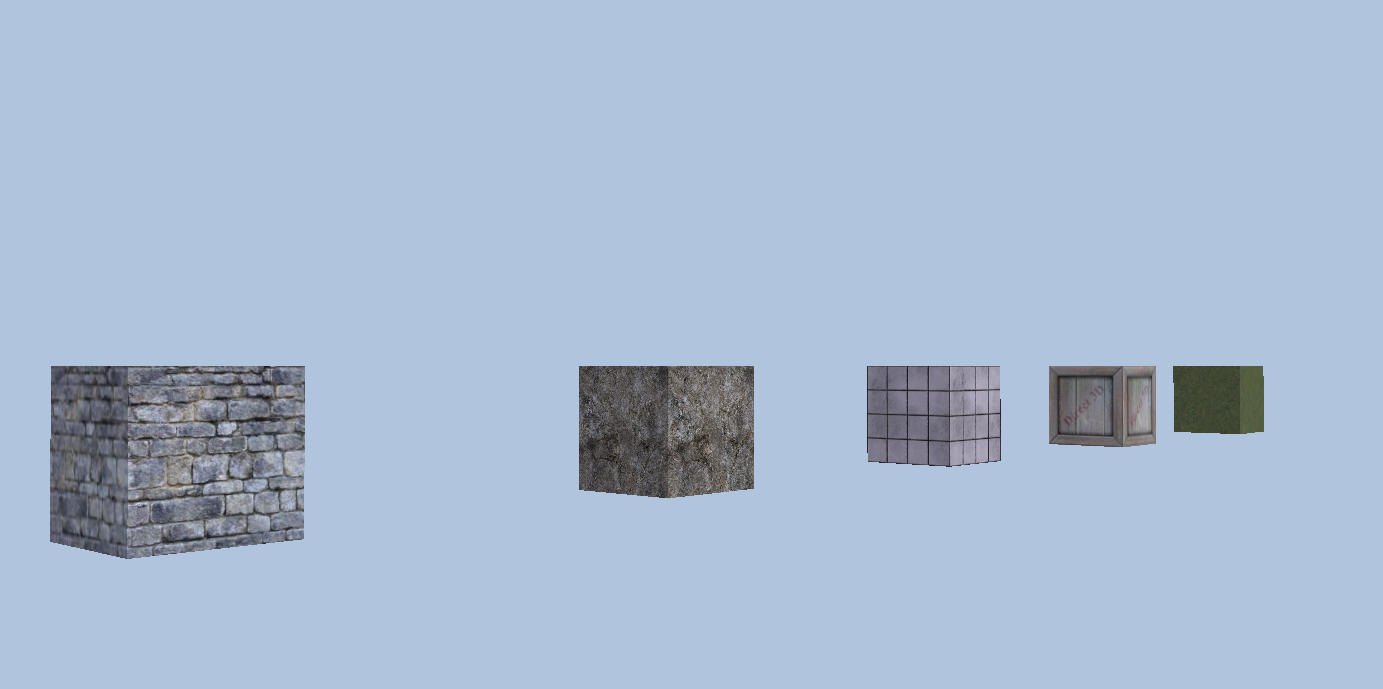
3. 다섯 개의 box를 5개의 머터리얼을 사용해서 그려라. 하지만 단일 매쉬를 이용해야 하고 texture index를 vertex마다 부여해서 구현해야 한다.
기존 방식대로 하면 5개의 box를 그리기 위햇 5번의 드로우콜을 거쳐야 하지만 문제에서는 Dynamic Indexing을 이용해서 한번의 드로우콜로 그리는 것을 요구하고 있다.
BuildShapeGeometry
1
2
3
4
5
6
7
8
9
10
11
12
13
14
15
16
17
18
19
20
21
22
23
24
25
26
27
28
29
30
31
32
33
34
35
36
37
38
39
40
41
42
43
44
45
46
47
48
49
50
51
52
53
54
55
56
57
58
59
60
61
62
63
64
65
66
67
68
69
70
71
72
73
74
75
76
77
78
79
80
81
void CameraAndDynamicIndexingApp::BuildShapeGeometry()
{
	GeometryGenerator geoGen;
	GeometryGenerator::MeshData box = geoGen.CreateBox(1.0f, 1.0f, 1.0f, 3);

	// 박스 5개의 위치 정의
	XMFLOAT3 boxPositions[5] = {
		XMFLOAT3(-8.0f, 0.0f, 0.0f),
		XMFLOAT3(-4.0f, 0.0f, 0.0f),
		XMFLOAT3(0.0f, 0.0f, 0.0f),
		XMFLOAT3(4.0f, 0.0f, 0.0f),
		XMFLOAT3(8.0f, 0.0f, 0.0f),
	};

	UINT singleBoxVertexCount = (UINT)box.Vertices.size();
	UINT singleBoxIndexCount = (UINT)box.Indices32.size();

	UINT totalVertexCount = singleBoxVertexCount * 5;
	UINT totalIndexCount = singleBoxIndexCount * 5;

	std::vector<CustomVertex> vertices(totalVertexCount);
	std::vector<std::uint16_t> indices;

	for (int b = 0; b < 5; b++)
	{
		UINT vertexOffset = b * singleBoxVertexCount;

		for (UINT i = 0; i < singleBoxVertexCount; i++)
		{
			UINT k = vertexOffset + i;
			vertices[k].Position = XMFLOAT3(
				box.Vertices[i].Position.x + boxPositions[b].x,
				box.Vertices[i].Position.y + boxPositions[b].y,
				box.Vertices[i].Position.z + boxPositions[b].z
			);
			vertices[k].Normal = box.Vertices[i].Normal;
			vertices[k].TangentU = box.Vertices[i].TangentU;
			vertices[k].TexC = box.Vertices[i].TexC;
			vertices[k].MatIndex = b;
		}

		for (UINT i = 0; i < singleBoxIndexCount; i++)
		{
			indices.push_back((std::uint16_t)(box.Indices32[i] + vertexOffset));
		}
	}

	// Submesh 하나로 전체 통합
	SubmeshGeometry submesh;
	submesh.IndexCount = totalIndexCount;
	submesh.StartIndexLocation = 0;
	submesh.BaseVertexLocation = 0;

	const UINT vbByteSize = totalVertexCount * sizeof(CustomVertex);
	const UINT ibByteSize = totalIndexCount * sizeof(std::uint16_t);

	auto geo = std::make_unique<MeshGeometry>();
	geo->Name = "shapeGeo";

	ThrowIfFailed(D3DCreateBlob(vbByteSize, &geo->VertexBufferCPU));
	CopyMemory(geo->VertexBufferCPU->GetBufferPointer(), vertices.data(), vbByteSize);

	ThrowIfFailed(D3DCreateBlob(ibByteSize, &geo->IndexBufferCPU));
	CopyMemory(geo->IndexBufferCPU->GetBufferPointer(), indices.data(), ibByteSize);

	geo->VertexBufferGPU = d3dUtil::CreateDefaultBuffer(md3dDevice.Get(),
		mCommandList.Get(), vertices.data(), vbByteSize, geo->VertexBufferUploader);

	geo->IndexBufferGPU = d3dUtil::CreateDefaultBuffer(md3dDevice.Get(),
		mCommandList.Get(), indices.data(), ibByteSize, geo->IndexBufferUploader);

	geo->VertexByteStride = sizeof(CustomVertex);
	geo->VertexBufferByteSize = vbByteSize;
	geo->IndexFormat = DXGI_FORMAT_R16_UINT;
	geo->IndexBufferByteSize = ibByteSize;

	geo->DrawArgs["box"] = submesh;

	mGeometries[geo->Name] = std::move(geo);
}
핵심은 Geometry에서 박스 5개를 하나의 랜더 아이템에 넣어놓고, 새로운 Vertex Struct를 만들어서 Texture ID를 넣는 것이다. 그렇게 되면 각 vertex마다 셰이더에서 해당하는 텍스쳐를 확인하고 넣을 수 가 있게된다.